Convert any HTML to Figma: just paste a URL and press convert.
Try htmltofigma.netHow to Create Quantity Bundles in Shopify Without an App (Increase AOV)
If you want to increase your Shopify store’s average order value (AOV), one of the most effective strategies is offering quantity bundle discounts like:
- Buy 1 → $19
- Buy 2 → Save 10%
- Buy 3 → Save 20%
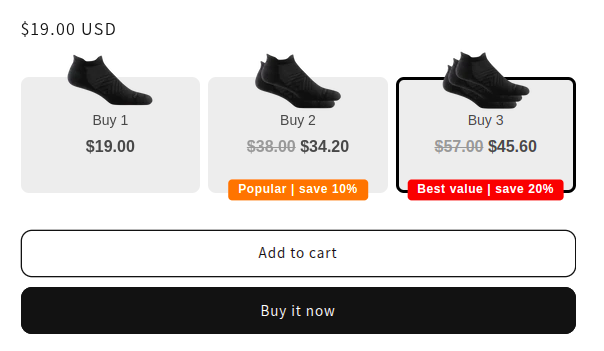
The problem? Most Shopify stores install heavy bundle apps that slow down the store and charge monthly fees.
In this guide, I’ll show you how to create a quantity bundle system directly inside your Shopify theme without using any app.
I have implemented this solution in Shopify DAWN theme and you can implement it in any theme if you have a little coding knowledge or maybe you can message me and I can also help you (I will charge $30 for implementing this on your store).
Benifits of native quanitity bundle:
- ✔ No monthly fees
- ✔ Faster page load
- ✔ Full design control
- ✔ Works with any theme
Quantity bundles work best for products that are consumable, reusable, or frequently bought in multiples.
- Socks & Apparel: People often need multiples; easy to justify “buy more, save more.”
- Supplements & Vitamins: Daily use products encourage bulk purchases.
- Pet Supplies: Food, treats, and chewables are bought regularly.
- Beauty & Skincare: Lotions, masks, and serums are replenished often.
- Snacks & Food Items: Consumables that run out quickly benefit from bundles.
- Cleaning & Household Supplies: Detergents, wipes, and paper products are used regularly.
- Stationery & Office Supplies: Pens, notebooks, and printer supplies are often purchased in sets.
- Fitness & Health Products: Resistance bands, protein powders, and recovery items work well in multiples.
Why Quantity Bundles Increase Sales
Quantity bundles work because they use psychological pricing and visual incentives.
When customers see options like:
Buy 2, Save 10% and Buy 3, Save 20% (Best Value), they naturally compare options and often choose the highest value bundle.
This strategy can help:
- ✔ Increase Average Order Value
- ✔ Encourage bulk purchases
- ✔ Reduce marketing acquisition costs
- ✔ Improve conversion rate
Many successful eCommerce brands use “Buy More, Save More” bundles on the product page to drive larger orders.
Why You Should Avoid Bundle Apps
Many Shopify merchants install apps to create bundles, but this can create several problems.
-
Slower Store Speed: Apps often load extra JavaScript and CSS, which slows down your product pages.
-
Monthly Costs: Bundle apps can cost $15–$50 per month, which adds up over time.
-
Limited Customization: Apps usually restrict how much you can customize the UI.
Steps
- Create a snippet named as:
buy-more-save-more.liquidand paste the following code inside it:
{% assign deal_1_final_price_cents = block.settings.deal_1_final_price | times: 100 %}
{% assign deal_2_final_price_cents = block.settings.deal_2_final_price | times: 100 %}
{% assign deal_3_final_price_cents = block.settings.deal_3_final_price | times: 100 %}

{% assign deal_1_quantity = block.settings.deal_1_quantity %}
{% assign deal_2_quantity = block.settings.deal_2_quantity %}
{% assign deal_3_quantity = block.settings.deal_3_quantity %}

{% assign deal_1_full_price = product.price | times: deal_1_quantity %}
{% assign deal_2_full_price = product.price | times: deal_2_quantity %}
{% assign deal_3_full_price = product.price | times: deal_3_quantity %}

{% assign deal_1_saved_cents = deal_1_full_price | minus: deal_1_final_price_cents %}
{% assign deal_2_saved_cents = deal_2_full_price | minus: deal_2_final_price_cents %}
{% assign deal_3_saved_cents = deal_3_full_price | minus: deal_3_final_price_cents %}

{% assign deal_1_saved_percent = deal_1_saved_cents | times: 100.0 | divided_by: deal_1_full_price %}
{% assign deal_2_saved_percent = deal_2_saved_cents | times: 100.0 | divided_by: deal_2_full_price %}
{% assign deal_3_saved_percent = deal_3_saved_cents | times: 100.0 | divided_by: deal_3_full_price %}

<div id="{{ block.id }}" class="buy-more-save-more">
  {%- if block.settings.heading_text != blank -%}
    <h3>{{ block.settings.heading_text }}</h3>
  {%- endif -%}

  <div class="deals">
  <!-- Deal 1 -->
  {% capture saving_1 %}
  {% if block.settings.show_percentage_saved %}
    {{ deal_1_saved_percent | round }}%
    {% else %}
    {{ deal_1_saved_cents | money }}
    {% endif %}
{% endcapture %}
  <div class="discount-option" data-quantity="{{ deal_1_quantity }}">
    {%- if block.settings.deal_1_image != blank -%}
      <div class="discount-deal-image">
        <img src="{{ block.settings.deal_1_image |  image_url: width: 100 }}" alt="deal 1 image">
      </div>
    {%- endif -%}
    {% if block.settings.deal_1_badge_text != blank %}
      <span class="discount-badge" style="background: {{ block.settings.deal_1_badge_color }}; color: white; padding: 2px 10px; border-radius: 4px;">
        {{ block.settings.deal_1_badge_text | replace: "|saving|", saving_1 }}
      </span>
    {% endif %}
    <input type="radio" name="quantity_discount" id="deal-1" hidden {% if preselect == 'deal_1' %}checked{% endif %}>
    <label for="deal-1">
      <div>{{ block.settings.deal_1_label | replace: "|saving|", saving_1 }}</div>
      <div class="discount-deal-price">
        {%- if deal_1_quantity != 1 -%}
          <s>{{ deal_1_full_price | money }}</s> {{ deal_1_final_price_cents | money }}
          {%- else -%}
          {{ deal_1_full_price | money }}
        {%- endif -%}
      </div>
    </label>
  </div>

  <!-- Deal 2 -->
  {% capture saving_2 %}
  {% if block.settings.show_percentage_saved %}
      {{ deal_2_saved_percent | round }}%
      {% else %}
      {{ deal_2_saved_cents | money }}
      {% endif %}
  {% endcapture %}
  <div class="discount-option selected" data-quantity="{{ deal_2_quantity }}" >
    {%- if block.settings.deal_2_image != blank -%}
      <div class="discount-deal-image">
        <img src="{{ block.settings.deal_2_image |  image_url: width: 100 }}" alt="deal 2 image">
      </div>
    {%- endif -%}
    {% if block.settings.deal_2_badge_text != blank %}
      <span class="discount-badge" style="background: {{ block.settings.deal_2_badge_color }}; color: white; padding: 2px 10px; border-radius: 4px;">
        {{ block.settings.deal_2_badge_text | replace: "|saving|", saving_2 }}
      </span>
    {% endif %}
    <input type="radio" name="quantity_discount" id="deal-2" hidden {% if preselect == 'deal_2' %}checked{% endif %}>
    <label for="deal-2">
      <div>{{ block.settings.deal_2_label | replace: "|saving|", saving_2 }}</div>
      <div class="discount-deal-price">
        <s>{{ deal_2_full_price | money }}</s> {{ deal_2_final_price_cents | money }}
      </div>
    </label>
  </div>

  <!-- Deal 3 -->
  {% capture saving_3 %}
  {% if block.settings.show_percentage_saved %}
      {{ deal_3_saved_percent | round }}%
      {% else %}
      {{ deal_3_saved_cents | money }}
      {% endif %}
  {% endcapture %}
  <div class="discount-option" data-quantity="{{ deal_3_quantity }}">
    {%- if block.settings.deal_3_image != blank -%}
      <div class="discount-deal-image">
        <img src="{{ block.settings.deal_3_image |  image_url: width: 100 }}" alt="deal 3 image">
      </div>
    {%- endif -%}
    {% if block.settings.deal_3_badge_text != blank %}
      <span class="discount-badge" style="background: {{ block.settings.deal_3_badge_color }}; color: white; padding: 2px 10px; border-radius: 4px;">
        {{ block.settings.deal_3_badge_text | replace: "|saving|", saving_3 }}
      </span>
    {% endif %}
    <input type="radio" name="quantity_discount" id="deal-3" hidden {% if preselect == 'deal_3' %}checked{% endif %}>
    <label for="deal-3">
      <div>{{ block.settings.deal_3_label | replace: "|saving|", saving_3 }}</div>
      <div class="discount-deal-price">
        <s>{{ deal_3_full_price | money }}</s> {{ deal_3_final_price_cents | money }}
      </div>
    </label>
  </div>

  </div>
</div>

<style>
  .product-form__input { display: none; }

  .wt-product__add-to-cart_form--wrapper quantity-counter {
    display: none !important;
  }
  .buy-more-save-more {
    background: #fff;
    border-radius: 10px;
    font-family: sans-serif;
  }
  .buy-more-save-more h3 {
    text-align: center;
    font-weight: bold;
    margin-bottom: 20px;
  }
  .buy-more-save-more .deals {
    display: grid;
    grid-template-columns: 1fr 1fr 1fr;
    gap: 8px;
    margin: 30px 0 0 0;
  }
  .discount-option {
    border: 3px solid transparent;
    border-radius: 8px;
    padding: 28px 12px;
    margin-bottom: 12px;
    transition: border-color 0.2s, background 0.2s;
    cursor: pointer;
    background-color: #EDEDED;
    position: relative;
    text-align: center;
  }
  .discount-option.selected {
    border-color: #000000;
  }
  .discount-option label {
    display: block;
    cursor: pointer;
    font-size: 14px;
    letter-spacing: 0;
  }
  .discount-deal-image {
    position: absolute;
    top: 0;
    left: 50%;
    transform: translate(-50%, -50%);
    width: auto;
    height: 100px;
  }
  .discount-deal-image img {
    height: 100%;
  }
  .discount-badge {
    position: absolute;
    bottom: 0;
    left: 50%;
    width: max-content;
    font-size: 12px;
    transform: translate(-50%, 50%);
    line-height: 1.4;
    font-weight: bold;
  }
  .discount-deal-price {
    font-weight: bold;
    font-size: 16px;
  }
  .discount-option s {
    color: #999;
  }
</style>

<script>
document.addEventListener('DOMContentLoaded', function() {
  const dealOptions = document.querySelectorAll('.buy-more-save-more .discount-option');
  const quantityInput = document.querySelector('input[name="quantity"]');

  function updateSelection(option) {
    dealOptions.forEach(opt => opt.classList.remove('selected'));
    option.classList.add('selected');
    const quantity = option.dataset.quantity;
    if (quantityInput) {
      quantityInput.value = quantity;
    }
  }

  dealOptions.forEach(option => {
    option.addEventListener('click', () => {
      const radio = option.querySelector('input[type="radio"]');
      radio.checked = true;
      updateSelection(option);
    });
  });

  // Initialize quantity on load (in case deal 2 is pre-selected)
  const selectedOption = document.querySelector('.discount-option.selected');
  if (selectedOption && quantityInput) {
    quantityInput.value = selectedOption.dataset.quantity;
  }
});
</script>- In
main-product.liquidsearch for"type": "@app"and after its closing curly bracket, paste the following code:
{
  "type": "buy_more_save_more",
  "name": "Buy more save more",
  "settings": [
    {
      "type": "text",
      "id": "heading_text",
      "label": "Heading Text",
      "default": "Buy more, save more! 💲"
    },
    {
      "type": "checkbox",
      "id": "show_percentage_saved",
      "label": "Show percentage saved instead of price saved",
      "default": true
    },
    {
      "type": "select",
      "id": "preselect_deal",
      "label": "Preselect Deal",
      "options": [
        { "value": "deal_1", "label": "Deal 1" },
        { "value": "deal_2", "label": "Deal 2" },
        { "value": "deal_3", "label": "Deal 3" }
      ],
      "default": "deal_2"
    },
    {
      "type": "header",
      "content": "Deal 1"
    },
    {
      "type": "inline_richtext",
      "id": "deal_1_label",
      "label": "Deal 1 Label",
      "default": "Buy 2 and <strong>save |saving|</strong>",
      "info": "|saving| will be replaced by actual saving amount"
    },
    {
      "type": "image_picker",
      "id": "deal_1_image",
      "label": "Deal 1 image"
    },
    {
      "type": "number",
      "id": "deal_1_quantity",
      "label": "Deal 1 Quantity",
      "default": 2
    },
    {
      "type": "number",
      "id": "deal_1_final_price",
      "label": "Deal 1 Final Price ($)",
      "default": 24
    },
    {
      "type": "text",
      "id": "deal_1_badge_text",
      "label": "Deal 1 Badge Text",
      "default": "save |saving|",
      "info": "|saving| will be replaced by actual saving amount"
    },
    {
      "type": "color",
      "id": "deal_1_badge_color",
      "label": "Deal 1 Badge Color",
      "default": "#f97316"
    },

    {
      "type": "header",
      "content": "Deal 2"
    },
    {
      "type": "inline_richtext",
      "id": "deal_2_label",
      "label": "Deal 2 Label",
      "default": "Buy 5 and <strong>save |saving|</strong>",
      "info": "|saving| will be replaced by actual saving amount"
    },
    {
      "type": "image_picker",
      "id": "deal_2_image",
      "label": "Deal 2 image"
    },
    {
      "type": "number",
      "id": "deal_2_quantity",
      "label": "Deal 2 Quantity",
      "default": 5
    },
    {
      "type": "number",
      "id": "deal_2_final_price",
      "label": "Deal 2 Final Price ($)",
      "default": 55
    },
    {
      "type": "text",
      "id": "deal_2_badge_text",
      "label": "Deal 2 Badge Text",
      "default": "save |saving|",
      "info": "|saving| will be replaced by actual saving amount"
    },
    {
      "type": "color",
      "id": "deal_2_badge_color",
      "label": "Deal 2 Badge Color",
      "default": "#FF7A00"
    },
    {
      "type": "header",
      "content": "Deal 3"
    },
    {
      "type": "inline_richtext",
      "id": "deal_3_label",
      "label": "Deal 3 Label",
      "default": "Buy 10+ and <strong>save |saving|</strong>",
      "info": "|saving| will be replaced by actual saving amount"
    },
    {
      "type": "image_picker",
      "id": "deal_3_image",
      "label": "Deal 3 image"
    },
    {
      "type": "number",
      "id": "deal_3_quantity",
      "label": "Deal 3 Quantity",
      "default": 10
    },
    {
      "type": "number",
      "id": "deal_3_final_price",
      "label": "Deal 3 Final Price ($)",
      "default": 95
    },
    {
      "type": "text",
      "id": "deal_3_badge_text",
      "label": "Deal 3 Badge Text",
      "default": "save |saving|",
      "info": "|saving| will be replaced by actual saving amount"
    },
    {
      "type": "color",
      "id": "deal_3_badge_color",
      "label": "Deal 3 Badge Color",
      "default": "#E53935"
    }
  ]
},- In
main-product.liquidsearch for{%- when '@app' -%}and above that line, paste the following code:
{% when 'buy_more_save_more' %}
{% render 'buy-more-save-more', section: section, block: block %}-
Go to theme editor and create a new product template, where we will use this block. And for the corresponding product assign this template. In this template, use this block and adjust the price and discounted value as required. (you can see the video for this step)
-
Then create the automatic discount according to your needs for the corresponding product.
Video Tutorial
Watch the step-by-step video tutorial here:
Reviews
Convert any HTML to Figma: just paste a URL and press convert.
Try htmltofigma.net