Convert any HTML to Figma: just paste a URL and press convert.
Try htmltofigma.netShopify Free Gift With Purchase: Custom Progress Bar, No App Needed
Increase Your Average Order Value with Free Shipping and Free Gifts
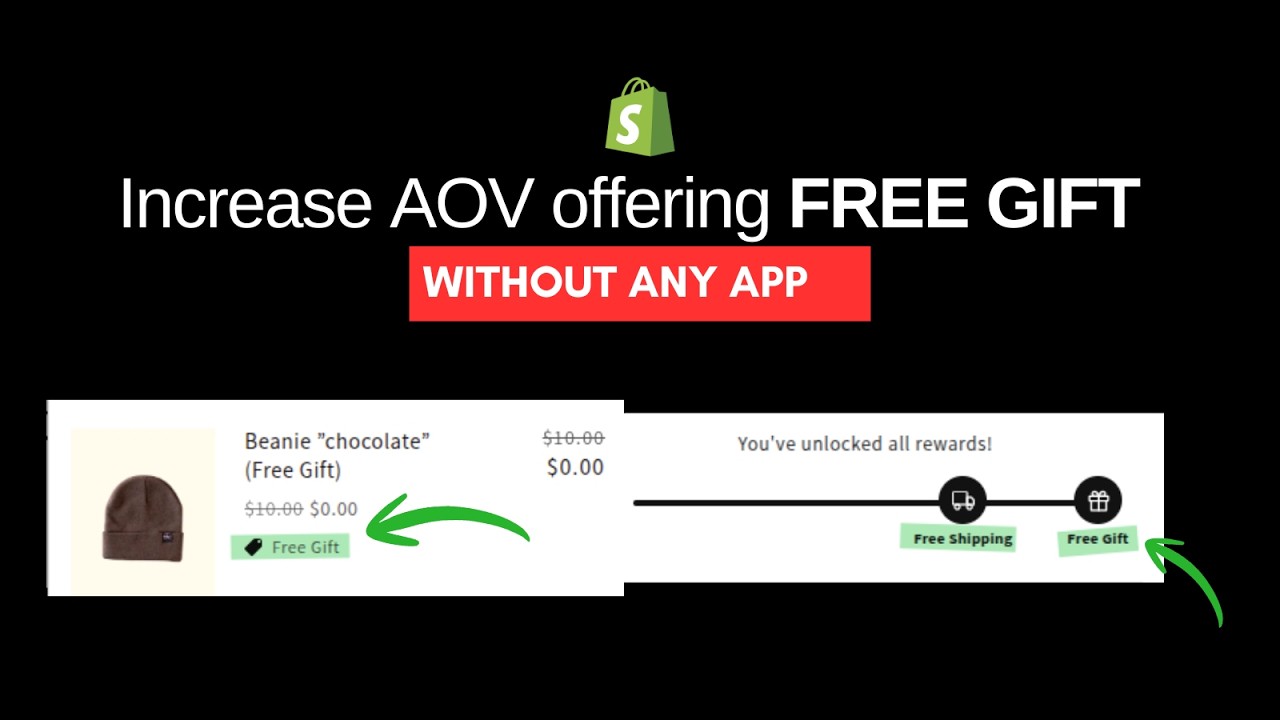
If your store’s average order value (AOV) is $40, you can encourage customers to spend a little more by offering free shipping at $50. Displaying a visual progress bar toward the free shipping threshold motivates customers to increase their order value to unlock the reward.
Want to boost AOV even further? Offer a free gift when customers reach a slightly higher spending amount. Again, a visual representation, like a progress bar for each reward gamifies the shopping experience and encourages higher spending.
Most of the shopify apps offer free gifts but they do not offer the streamlined user experience, with this solution you can implement directly into your shopify store without monthly recurring shopify app fee.
I’ve implemented this solution in the Dawn theme, and it’s ready to copy and paste into your store. If you’d like help implementing it, view my Shopify services, I specialise in custom Shopify development and can get it set up for you quickly.
Steps
1. Create Schema Settings
In the file settings_schema.json, search for the line "content": "t:settings_schema.cart.settings.cart_drawer.header" and before the opening curly bracket, add the following settings:
{
  "type": "header",
  "content": "t:settings_schema.cart.settings.free_shipping_bar.header"
},
{
  "type": "checkbox",
  "id": "show_free_shipping_bar",
  "label": "t:settings_schema.cart.settings.show_free_shipping_bar.label",
  "default": true
},
{
  "type": "number",
  "id": "free_shipping_threshold",
  "label": "t:settings_schema.cart.settings.free_shipping_threshold.label",
  "default": 50
},
{
  "type": "number",
  "id": "free_gift_threshold",
  "label": "t:settings_schema.cart.settings.free_gift_threshold.label",
  "info": "t:settings_schema.cart.settings.free_gift_threshold.info",
  "default": 70
},
{
  "type": "product",
  "id": "free_gift_item",
  "label": "Item to add as free Gift"
},
2. Add Schema Translations
In the file en.default.schema.json search for "cart_drawer": { and add these translations above that line:
"free_shipping_bar": {
  "header": "Free shipping bar"
},
"show_free_shipping_bar": {
  "label": "Show free shipping progress bar"
},
"free_shipping_threshold": {
  "label": "Free shipping threshold ($)"
},
"free_gift_threshold": {
  "label": "Free gift threshold ($)",
  "info": "Set to 0 to hide the free gift milestone on the progress bar"
},
In the file en.default.json search for "empty": "Your cart is empty", and add the following lines below that:
"free_shipping_progress_html": "Add <strong>{{ amount }}</strong> more for free shipping",
"free_shipping_achieved": "You've unlocked free shipping!",
"free_shipping_milestone_label": "Free Shipping",
"free_gift_progress_html": "Add <strong>{{ amount }}</strong> more to unlock your free gift",
"free_gift_milestone_label": "Free Gift",
"all_rewards_achieved": "You've unlocked all rewards!",
3. Create a Snippet
Create a new snippet file named cart-rewards-bar.liquid and paste the following code:
{% comment %}
  Renders the cart rewards progress bar with free shipping and free gift milestones.

  Depends on theme settings:
    - settings.show_free_shipping_bar  (toggle for the whole bar)
    - settings.free_shipping_threshold (amount in dollars)
    - settings.free_gift_threshold     (amount in dollars, 0 = disabled)
{% endcomment %}

{%- liquid
  assign free_shipping_cents = settings.free_shipping_threshold | times: 100
  assign free_gift_cents      = settings.free_gift_threshold | times: 100
  assign show_gift            = false
  if free_gift_cents > 0
    assign show_gift = true
  endif

  assign max_cents = free_shipping_cents
  if show_gift and free_gift_cents > max_cents
    assign max_cents = free_gift_cents
  endif

  assign cart_total    = cart.total_price
  assign progress_pct  = cart_total | times: 100 | divided_by: max_cents
  if progress_pct > 100
    assign progress_pct = 100
  endif

  assign shipping_pos = free_shipping_cents | times: 100 | divided_by: max_cents
  assign gift_pos     = 100
  if show_gift and free_gift_cents < max_cents
    assign gift_pos = free_gift_cents | times: 100 | divided_by: max_cents
  endif

  assign shipping_unlocked = false
  if cart_total >= free_shipping_cents
    assign shipping_unlocked = true
  endif

  assign gift_unlocked = false
  if show_gift and cart_total >= free_gift_cents
    assign gift_unlocked = true
  endif

  assign remaining_shipping = free_shipping_cents | minus: cart_total | money
  assign remaining_gift     = free_gift_cents     | minus: cart_total | money
-%}

<style>
  .rewards-bar {
    padding: 1rem 0 4rem;
    border-bottom: 0.1rem solid rgba(var(--color-foreground), 0.08);
    margin-bottom: 0.5rem;
  }

  .rewards-bar__message {
    font-size: 1.3rem;
    text-align: center;
    margin: 0 0 1.4rem;
    color: rgb(var(--color-foreground));
    line-height: 1.4;
  }

  .rewards-bar__message strong {
    font-weight: 700;
  }

  .rewards-bar__track-wrap {
    position: relative;
    margin: 0 3rem;
    padding-bottom: 2.8rem;
  }

  .rewards-bar__track {
    height: 0.4rem;
    background: rgba(var(--color-foreground), 0.12);
    border-radius: 10rem;
    position: absolute;
    overflow: visible;
    top: 50%;
    width: 100%;
    left: 0;
  }

  .rewards-bar__fill {
    position: absolute;
    left: 0;
    top: 0;
    height: 100%;
    background: rgb(var(--color-button));
    border-radius: 10rem;
    transition: width 0.5s ease;
    max-width: 100%;
    display: block !important;
  }

  .rewards-bar__milestone {
    position: absolute;
    top: 50%;
    left: var(--rewards-pos);
    transform: translate(-50%, -50%);
    display: flex;
    flex-direction: column;
    align-items: center;
    gap: 0.5rem;
    z-index: 1;
  }

  .rewards-bar__bubble {
    width: 3.2rem;
    height: 3.2rem;
    border-radius: 50%;
    background: rgb(var(--color-background));
    border: 0.2rem solid rgba(var(--color-foreground), 0.18);
    display: flex;
    align-items: center;
    justify-content: center;
    transition: background 0.35s ease, border-color 0.35s ease, color 0.35s ease;
    color: rgba(var(--color-foreground), 0.4);
    flex-shrink: 0;
  }

  .rewards-bar__bubble svg {
    width: 1.5rem;
    height: 1.5rem;
    display: block;
  }

  .rewards-bar__milestone.is-unlocked .rewards-bar__bubble {
    background: rgb(var(--color-button));
    border-color: rgb(var(--color-button));
    color: rgb(var(--color-button-text));
  }

  .rewards-bar__label {
    position: absolute;
    top: calc(100% + 0.4rem);
    left: 50%;
    transform: translateX(-50%);
    white-space: nowrap;
    font-size: 1.05rem;
    color: rgba(var(--color-foreground), 0.55);
    font-weight: 500;
    letter-spacing: 0.02em;
    line-height: 1;
  }

  .rewards-bar__milestone.is-unlocked .rewards-bar__label {
    color: rgb(var(--color-foreground));
    font-weight: 600;
  }

  .free_gift_item.cart-item__quantity {
    display: none;
  }
</style>

<div class="rewards-bar">
  <p class="rewards-bar__message">
    {%- if show_gift and gift_unlocked -%}
      {{ 'sections.cart.all_rewards_achieved' | t }}
    {%- elsif show_gift and shipping_unlocked -%}
      {{ 'sections.cart.free_gift_progress_html' | t: amount: remaining_gift }}
    {%- elsif shipping_unlocked -%}
      {{ 'sections.cart.free_shipping_achieved' | t }}
    {%- else -%}
      {{ 'sections.cart.free_shipping_progress_html' | t: amount: remaining_shipping }}
    {%- endif -%}
  </p>

  <div class="rewards-bar__track-wrap">
    <div class="rewards-bar__track">
      <div class="rewards-bar__fill" style="width: {{ progress_pct }}%"></div>
    </div>

    <div
      class="rewards-bar__milestone{% if shipping_unlocked %} is-unlocked{% endif %}"
      style="--rewards-pos: {{ shipping_pos }}%"
    >
      <div class="rewards-bar__bubble">
        <svg xmlns="http://www.w3.org/2000/svg" viewBox="0 0 24 24" fill="none" stroke="currentColor" stroke-width="2" stroke-linecap="round" stroke-linejoin="round" aria-hidden="true">
          <rect x="1" y="3" width="15" height="13" rx="1"/>
          <polygon points="16 8 20 8 23 11 23 16 16 16 16 8"/>
          <circle cx="5.5" cy="18.5" r="2.5"/>
          <circle cx="18.5" cy="18.5" r="2.5"/>
        </svg>
      </div>
      <span class="rewards-bar__label">{{ 'sections.cart.free_shipping_milestone_label' | t }}</span>
    </div>

    {%- if show_gift -%}
      <div
        class="rewards-bar__milestone{% if gift_unlocked %} is-unlocked{% endif %}"
        style="--rewards-pos: {{ gift_pos }}%"
      >
        <div class="rewards-bar__bubble">
          <svg xmlns="http://www.w3.org/2000/svg" viewBox="0 0 24 24" fill="none" stroke="currentColor" stroke-width="2" stroke-linecap="round" stroke-linejoin="round" aria-hidden="true">
            <polyline points="20 12 20 22 4 22 4 12"/>
            <rect x="2" y="7" width="20" height="5" rx="1"/>
            <line x1="12" y1="22" x2="12" y2="7"/>
            <path d="M12 7H7.5a2.5 2.5 0 0 1 0-5C11 2 12 7 12 7z"/>
            <path d="M12 7h4.5a2.5 2.5 0 0 0 0-5C13 2 12 7 12 7z"/>
          </svg>
        </div>
        <span class="rewards-bar__label">{{ 'sections.cart.free_gift_milestone_label' | t }}</span>
      </div>
    {%- endif -%}
  </div>
</div>
4. Update cart-drawer.liquid
In the snippet: cart-drawer.liquid file, locate the line above <cart-drawer-items and paste the following code:
{%- if settings.show_free_shipping_bar and cart != empty -%}
  {%- render 'cart-rewards-bar' -%}
{%- endif -%}
5. Update theme.liquid
In the theme.liquid file, search for the line </head> and paste the following snippet above it. Replace beanie-chocolate-free-gift with the handle of your unlisted free gift item:
{%- if settings.free_gift_threshold > 0 -%}
  <script defer="defer" data-free-gift>
    {%- assign free_gift_item = settings.free_gift_item | default: 'beanie-chocolate-free-gift' -%}
    {%- assign free_gift_id = all_products[free_gift_item].selected_or_first_available_variant.id -%}
    const free_gift_item = "{{ free_gift_item }}";
    const free_gift_id = "{{ free_gift_id }}";
    const free_gift_threshold = {{ settings.free_gift_threshold | default: 70 | times: 100 }};

    document.addEventListener("DOMContentLoaded", async () => {
      const res = await fetch('/cart.js');
      const cart = await res.json();

      handleFreegift(cart.total_price, cart.items);

      subscribe(PUB_SUB_EVENTS.cartUpdate, async () => {
        try {
          const res = await fetch('/cart.js');
          const cart = await res.json();

          handleFreegift(cart.total_price, cart.items);
        } catch (error) {
          console.error("Cart update error:", error);
        }
      });
    });

    async function handleFreegift(cart_total, cart_items) {
      try {
        const giftInCart = cart_items.find(item => item.handle === free_gift_item);

        // THRESHOLD MET → ADD GIFT IF NOT PRESENT
        if (cart_total >= free_gift_threshold) {
          if (!giftInCart) {
            console.log("Adding free gift");

            await fetch('/cart/add.js', {
              method: 'POST',
              headers: {
                'Content-Type': 'application/json'
              },
              body: JSON.stringify({
                id: free_gift_id,
                quantity: 1
              })
            });

            document.dispatchEvent(new CustomEvent('cart:refresh'));
            publish(PUB_SUB_EVENTS.cartUpdate, { source: 'custom' });
          } else {
            console.log("Free gift already in cart");
          }
        }

        // THRESHOLD NOT MET → REMOVE GIFT IF PRESENT
        else {
          if (giftInCart) {
            console.log("Removing free gift");

            await fetch('/cart/change.js', {
              method: 'POST',
              headers: {
                'Content-Type': 'application/json'
              },
              body: JSON.stringify({
                id: giftInCart.key,
                quantity: 0
              })
            });

            document.dispatchEvent(new CustomEvent('cart:refresh'));
            publish(PUB_SUB_EVENTS.cartUpdate, { source: 'custom' });
          }
        }

      } catch (error) {
        console.error("Free gift error:", error);
      }
    }
  </script>
{%- endif -%}
6. Create an Automatic Discount
Set up an automatic discount for the free gift item. Ensure the free gift item is unlisted so customers cannot purchase it directly. This item will only be added to the cart when the free gift threshold is met. Select the free gift product in the theme settings you created earlier.
7. Hide the quantity buttons on free gift item in the cart
Go to the snippets -> cart-drawer.liquid and search for class="cart-item__quantity , then add this code after that: {% if item.product.handle == free_gift_handle %} free_gift_item {% endif %} and also in the line above that you to add this line: {%- assign free_gift_handle = settings.free_gift_item | default: 'beanie-chocolate-free-gift' -%}
This step will hide the quantity buttons for the free gift and useds will not be able to add more than 1 free gifts in the cart.
Video Tutorial
Watch the step-by-step video tutorial here:
Reviews
Convert any HTML to Figma: just paste a URL and press convert.
Try htmltofigma.net